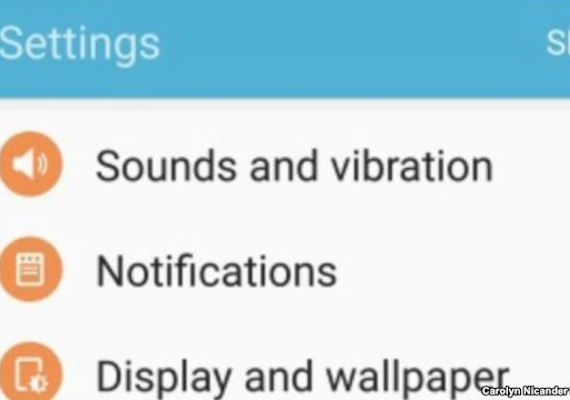
Does your mobile phone’s battery die more quickly than it once did? Apps may be the problem. Even if you did not add new apps to your phone, an app update alone can use lots of battery power. But you can check your apps to see how much battery they have been using. If an app you do not use much requires a lot of battery power, you might want to remove it from your phone. To check an iPhone or iPad, open the Settings app, then go to Battery. Recent battery use percentages for each app will appear. The device measures use in the last 24 hours and last seven days. You can also see whether an app has been using battery life to update. Tap on the clock icon for either last 24 hours or last seven days. That will show how much time the app has been open on your screen and how much time it has spent working. Android phones can show you which apps have used the most battery recently.
Title: Which Apps Drain Your Phone’s Battery?
Content: <div id='article-page'><div id='article-content' data-media-url='//news-app-staging.s3.amazonaws.com' data-base-url='//news-app-staging.herokuapp.com' data-sound-name='https://news-app-production.s3.amazonaws.com/articles/972/drain_audio.m4a' data-capture-url='//staging.analytics.lingraphica.com/events/capture_news' data-article-title='Which Apps Drain Your Phones Battery?' data-article-id='1424'><script src='//news-app-staging.herokuapp.com/javascripts/getscripts.js'></script><link rel='stylesheet' href='//news-app-staging.herokuapp.com/stylesheets/article.css' type='text/css' /><div class='article'><p><span data-start-time='0' data-end-time='6292'>Does your mobile phone’s battery die more quickly than it once did? </span> <span data-start-time='6292' data-end-time='9583'>Apps may be the problem. </span> <span data-start-time='9583' data-end-time='20146'>Even if you did not add new apps to your phone, an app update alone can use lots of battery power.</span> <span data-start-time='20146' data-end-time='26646'>But you can check your apps to see how much battery they have been using. </span> <span data-start-time='26646' data-end-time='36854'>If an app you do not use much requires a lot of battery power, you might want to remove it from your phone.</span> <span data-start-time='36854' data-end-time='44833'>To check an iPhone or iPad, open the Settings app, then go to Battery.</span> <span data-start-time='44833' data-end-time='50875'>Recent battery use percentages for each app will appear. </span> <span data-start-time='50875' data-end-time='58646'>The device measures use in the last 24 hours and last seven days.</span> <span data-start-time='58646' data-end-time='65188'>You can also see whether an app has been using battery life to update.</span> <span data-start-time='65188' data-end-time='73458'>Tap on the clock icon for either last 24 hours or last seven days. </span> <span data-start-time='73458' data-end-time='83313'>That will show how much time the app has been open on your screen and how much time it has spent working.</span> <span data-start-time='83313' data-end-time='90396'>Android phones can show you which apps have used the most battery recently.</span> </p></div><div class='control-buttons-sticky' style='display:none;'><div class='control-buttons'><button title='Back' class='back' disabled='disabled'></button><button title='Play' class='play' disabled='disabled'></button><button title='Pause' class='pause' style='display:none;'></button><button title='Forward' class='forward' disabled='disabled'></button><button class='finished-reading' style='display:none;'>Done</button></div></div></div><div id='article-media'><div id='media-image'><img src='https://news-app-production.s3.amazonaws.com/articles/972/battt_img.jpg'/></div></div><div id='question-content' style='display:none;'><div class='vocabulary_question question-container' data-question-id=5848 data-hint-location='9583' style='display:none;'><div class='question' data-sound-name='https://news-app-production.s3.amazonaws.com/articles/972/what_does_update_mean.m4a'>What does update mean?</div><div class='choices' data-correct-choice='a change to software that includes the most recent information'><div class='choice' data-sound-name='https://news-app-production.s3.amazonaws.com/articles/972/special_purpose.m4a'><span>special purpose</span></div><div class='choice' data-sound-name='https://news-app-production.s3.amazonaws.com/articles/972/from_one_place_to_another.m4a'><span>from one place to another</span></div><div class='choice' data-sound-name='https://news-app-production.s3.amazonaws.com/articles/972/inside_a_machine.m4a'><span>inside a machine</span></div><div class='choice' data-sound-name='https://news-app-production.s3.amazonaws.com/articles/972/a_change_to_software_that_includes_the_most_recent_information.m4a'><span>a change to software that includes the most recent information</span></div></div></div><div class='multiple_choice_question question-container' data-question-id=5849 data-hint-location='6292' style='display:none;'><div class='question' data-sound-name='https://news-app-production.s3.amazonaws.com/articles/972/what_can_cause_your_phone_battery_to_die_sooner.m4a'>What can cause your phone battery to die sooner?</div><div class='choices' data-correct-choice='apps'><div class='choice' data-sound-name='https://news-app-production.s3.amazonaws.com/articles/972/calls.m4a'><span>calls</span></div><div class='choice' data-sound-name='https://news-app-production.s3.amazonaws.com/articles/972/pictures.m4a'><span>pictures</span></div><div class='choice' data-sound-name='https://news-app-production.s3.amazonaws.com/articles/972/apps.m4a'><span>apps</span></div><div class='choice' data-sound-name='https://news-app-production.s3.amazonaws.com/articles/972/texts.m4a'><span>texts</span></div></div></div><div class='sentence_completion_question question-container' data-question-id=5850 data-hint-location='44833' style='display:none;'><div class='question' data-sound-name='https://news-app-production.s3.amazonaws.com/articles/972/you_can_check_recent__blank__use_percentages_for_any_app_.m4a'>You can check recent <span class='blank'>battery</span> use percentages for any app. </div><div class='choices' data-correct-choice='battery'><div class='choice' data-sound-name='https://news-app-production.s3.amazonaws.com/articles/972/data.m4a'><span>data</span></div><div class='choice' data-sound-name='https://news-app-production.s3.amazonaws.com/articles/972/overage.m4a'><span>overage</span></div><div class='choice' data-sound-name='https://news-app-production.s3.amazonaws.com/articles/972/battery.m4a'><span>battery</span></div><div class='choice' data-sound-name='https://news-app-production.s3.amazonaws.com/articles/972/internet.m4a'><span>internet</span></div></div></div><div class='question-buttons'><button class='skip-button'></button><button class='hint-button'></button><button class='speak-button'></button></div></div></div>
Sound Name: https://news-app-production.s3.amazonaws.com/articles/972/drain_audio.m4a
Preview